Proactively Lazy

Get more done by embracing laziness. Motivation—the fickle beast—doesn’t make you productive, your interaction with your environment does. Use your motivation to improve the environment by reducing—or increasing—the energy needed do things. Clean the dishes as soon as you finish your meal, display your guitar on a stand instead of in the closet, log out of all social media accounts when you finish scrolling. James Clear, in his book Atomic Habits, quoted Oswald Nuckols who said, “People think I work hard but I’m actually really lazy. I’m just proactively lazy.” Use your motivation energy to reduce the “activation energy” of productivity by improving your environment. Embrace your laziness—proactively.
How to Open Files with Vim

How exactly do you open a new file without closing and reopening vim? Read on to learn more about how to open files (or buffers) in vim using various included tools or external plugins. Vim uses the word “buffer” instead of “file”. When you :wq you write the current buffer to a file.

Read More ...

Getting started with vim-airline

The default vim status line can work well but vim-airline inhances it in many ways. Vim-airline is a simple lightweight plugin that integrates with many other popular plugins out of the box (but they are not required). In this post you will learn how to get vim-airline setup with some basic settings and a theme.

Read More ...

Vim Plugin Audit

Vim is my daily driver for text editing. I keep my plugin list curated to only what I use on a regular basis. In this post I’m going to go over each plugin currently in my plug file, write a sentence about it, and determine whether is stays or goes.

Read More ...

Roland FP-30 and Bluetooth

This may work on other Roland digital piano models but I only tested it on an FP-30 with my Motorola X4. After spending about an hour trying to figure out why my system Bluetooth could not find my piano I figured out how to actually connect. (Hint: it’s not through the system Bluetooth)

  1. Download the Roland Piano Partner 2 App
  2. Turn on your piano
  3. Enable Bluetooth on your phone
  4. Turn on the Piano Bluetooth feature (on the FP-30 you hold the function/Bluetooth button and press A0)
  5. Open the Piano Partner App
  6. Tap the Gearbox in the top right corner
  7. Tap “Bluetooth MIDI Device”
  8. Tap “SCAN” (Potentially not needed step)
  9. Select your piano from the list (FP-30 in my case)
  10. A Successful connection is when an * shows up next to the name
  11. Go “Back” on your phone (tap the triangle in Android 9.0)
  12. You will see a “Preparing Data” loading bar show up
  13. Success you are now connected to your piano
  14. Practice.

This is confusing and I could not find how to do it in the manual or online but an hour of trouble shooting got me to these steps. If it’s not helpful to anyone else out there at least now I have it written out for myself.

Vim Has Spell Check!?

Did you know vim has a build in spell check system? The built in spell system will ignore code variable names and functions by default but it does detect spelling mistakes in your comments and doc blocks (you do write helpful comments right?).

Read More ...

A Better Way to Organize Your .vimrc

Vim is a powerful customizable editor. Configuration is stored in custom text files often found in a Unix home directory (ie ~/.vimrc). This vimrc file can get to be rather large the longer one uses vim.

Break the file into parts

The number of files you use is infinite but it works best to keep things simple and organized. I use five files: plugin loader, general settings, leader key settings, custom functions, and plugin specific settings. Source each of these in your main vimrc $HOME/.vimrc. The $HOME/.vim/init directory is not used by vim so I keep my files there.

Read More ...

How to Use the Vim <leader> Key

Vim is a keyboard driven text editor which means there are a lot of keyboard shortcuts and commands. The <leader> key is a vim tool that can be used to create personalized shortcuts. Let’s discuss a few different ways to create our own shortcuts.

Read More ...

Refactoring a Rails View

Have you ever looked back on your code and thought “Who wrote this! ….<git blame>…oh…it was me.” We are all constantly learning new things and frankly our past self is just not as smart as our current self (or so we think). So today I want to walk through a simple refactor I did on a Rails project I have worked on over the years. (Source code found on my GitHub)

Read More ...

Qgis Tutorial – Earthquakes in Oklahoma

Download your own copy of QGIS from qgis.com (works on Windows, MacOS X, and Linux)

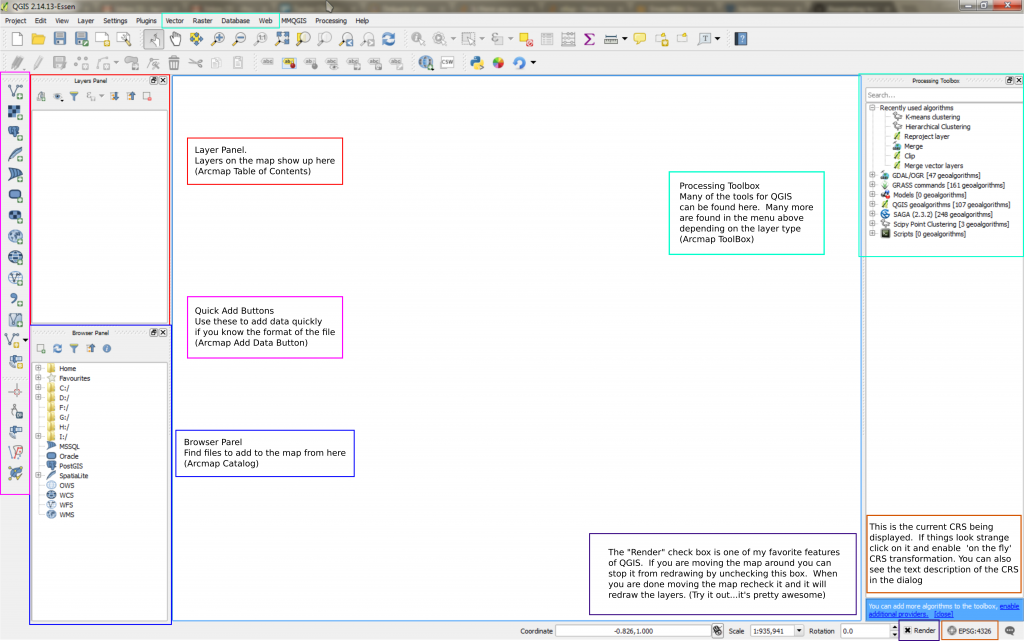
Overview of the Interface

Welcome to QGIS! Quantum GIS (now just known as QGIS) is a cross-platform, free, and open source GIS application. It has all of the features one needs in a GIS and many more can be added simply using the community hosted plugin repository. The QGIS UI Reference Image can be used to get yourself situated if you are familiar with the ArcMap for Desktop UI.

Read More ...